


| İlan No: | #00252772 |
| Kategori: | Switch |
| Marka: | Huawei |
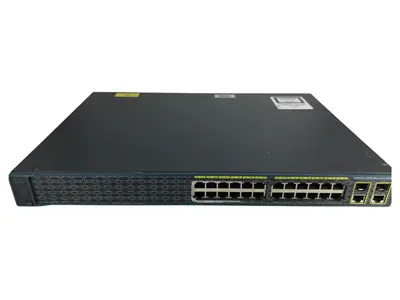
| Model Tipi: | S310-24T4X |
| Ürün Tipi: | Satılık |
| Ürün Durumu: | Sıfır |
| Menşei: | Türkiye |
| Konum: | Kartaltepe Mah. / Bayrampaşa / İstanbul |
| Satış Detayı: | Havale / EFT, Kredi Kartı, Görüşülür |
| Teslim Durumu: | Stokta Var |


S310-24T4X (24*10/100/1000BASE-T ports, 4*10GE SFP+ ports, built-in AC power) 1 One MODE button 2 Twenty-four 10/100/1000BASE-T ports 3 Four 10GE SFP+ ports 4 One console port 5 One RST button To restore the factory settings and reset the device, hold down the button for at least 6 seconds. To reset the device, press the button. Resetting the device will cause service interruption. Exercise caution when you press the button. 6 Ground screw 7 Jack for AC power cable locking strap 8 AC socket It is used with an AC power cable. Ethernet cable Console cable The S310-24P4X model is used as an example. Non-PoE models do not have PoE indicator and PoE mode. No. Indicator Name Color Status Description 1 PWR Power module indicator - Off The switch is powered off. Green Steady on The power supply is normal. 2 SYS System status indicator - Off The system is not running. Green Fast blinking The system is starting. Green Steady on During the system startup preparation phase, the SYS indicator is steady green, which lasts for a maximum of 30 seconds. Green Slow blinking The system is running normally. Red Steady on The system does not work normally after registration, or a fan alarm or a temperature alarm has been generated. 3 MST Stack indicator - Off Green Steady on The stack mode is selected. The switch is a standby or slave switch in a stack, and the service port indicators show the stack ID of the switch. Green Blinking 4 PoE PoE indicator - Off The PoE mode is not selected. Green Steady on The PoE mode is selected, and service port indicators show the PoE status of each port. 5 MODE Mode switch button - - If you do not press the MODE button within 45 seconds, the service port indicators restore to the default mode. In this case, the PoE indicator is off. 6 - Service port indicator (one indicator for each port) Arrowheads show the positions of ports. A down arrowhead indicates a port at the bottom, and an up arrowhead indicates a port at the top. Meanings of service port indicators vary in different modes. For details, see Table 4-94. If a power failure occurs on a device's PCB board, indicators of the last four GE or 10GE optical ports on the device's front panel blink green cyclically at an interval of 1 second, with each indicator illuminating for 0.25 seconds. 7 CLOUD Cloud indicator - This indicator is reserved. Display Mode Color Status Description Default mode - Off The port is not connected or has been shut down. Green Steady on A link has been established on the port. Green Blinking The port is sending or receiving data. MST stack mode - Off Port indicators do not show the stack ID of the switch. Green Steady on The switch is not the master switch in a stack. If the indicator of a port is steady on, the number of this port is the stack ID of the switch. Green Blinking The switch is the master switch in a stack. If the indicator of a port is blinking, the number of this port is the stack ID of the switch. PoE mode - Off The port is not providing power to a powered device (PD). Green Steady on The port is providing power to a PD. Green Blinking The power of the PD connected to the port exceeds the power capacity of the port or the power threshold configured on the port. Alternatively, the PD does not comply with IEEE standards. The switch has a built-in AC power module and does not support pluggable power modules. The switch has a built-in fan for forced air cooling. Air flows in from the left side and front panel, and exhausts from the right side. When working properly at a normal temperature, the device meets the desktop-class noise requirements. However, the fan speed may be high and the noise may be loud during device startup. This figure only shows the airflow direction and does not depict the actual device. Basic dimensions (excluding the parts protruding from the body): 43.6 mm x 442.0 mm x 220.0 mm (1.72 in. x 17.4 in. x 8.66 in.) Maximum dimensions (the depth is the distance from ports on the front panel to the parts protruding from the rear panel): 43.6 mm x 442.0 mm x 227.0 mm (1.72 in. x 17.4 in. x 8.94 in.) When the altitude is 1800–5000 m (5906–16404 ft.), the highest operating temperature reduces by 1°C (1.8°F) every time the altitude increases by 220 m (722 ft.). Devices cannot start when the temperature is lower than 0°C (32°F). EMC certification Safety certification Manufacturing certification
S310-24T4X
Overview
Table 4-91 Basic information about the S310-24T4X
Item
Details
Description
S310-24T4X (24*10/100/1000BASE-T ports, 4*10GE SFP+ ports, built-in AC power)
Part Number
98012381
Model
S310-24T4X
First supported version
V600R023C00
Components
Figure 4-31 S310-24T4X appearance
NOTICE:
NOTE:
It is used with a ground cable.
NOTE:
The AC power cable locking strap is not delivered with the switch.
NOTE:
Ports
Table 4-92 Ports on the S310-24T4X
Port
Connector Type
Description
Available Components
10/100/1000BASE-T port
RJ45
A 10/100/1000BASE-T Ethernet electrical port sends and receives service data at 10/100/1000 Mbit/s.
10GE SFP+ port
SFP+
A 10GE SFP+ Ethernet optical port supports auto-sensing to 1000 Mbit/s. It sends and receives service data at 1000 Mbit/s or 10 Gbit/s.
Console port
RJ45
The console port is connected to a console for on-site configuration.
Indicators and Buttons
Figure 4-32 Indicators on the Switch
Table 4-93 Description of indicators on the switch
NOTE:
Table 4-94 Description of service port indicators in different modes (one indicator for each port)
Power Supply System
Heat Dissipation System
Technical Specifications
Table 4-95 Technical specifications of the S310-24T4X
Item
Specification
Dimensions without packaging (H x W x D) [mm(in.)]
Dimensions with packaging (H x W x D) [mm(in.)]
90.0 mm x 550.0 mm x 360.0 mm (3.54 in. x 21.65 in. x 14.17 in.)
Chassis height [U]
1 U
Chassis material
Metal
Weight without packaging [kg(lb)]
2.32 kg (5.11 lb)
Weight with packaging [kg(lb)]
3.44 kg (7.58 lb)
Typical power consumption [W]
27.27 W
Typical heat dissipation [BTU/hour]
93.05 BTU/hour
Maximum power consumption [W]
35.04 W
Maximum heat dissipation [BTU/hour]
119.56 BTU/hour
Static power consumption [W]
19.00 W
MTBF [years]
70.75 years
MTTR [hours]
2 hours
Availability
> 0.99999
Noise at normal temperature (acoustic power) [dB(A)]
47 dB(A)
Noise at normal temperature (acoustic pressure) [dB(A)]
35 dB(A)
Number of card slots
0
Number of power slots
0
Number of fans modules
1
Switching capacity
To obtain data of this specification item, see the corresponding datasheet or contact the product sales personnel.
Packet forwarding rate
To obtain data of this specification item, see the corresponding datasheet or contact the product sales personnel.
Uplink ports
4 x 10GE SFP+ ports
Downlink ports
24 x 10/100/1000BASE-T ports
Redundant power supply
Not supported
Long-term operating temperature [°C(°F)]
-5°C to +50°C (23°F to 122°F) at an altitude of 0-1800 m (0-5905.44 ft.)
Restriction on the operating temperature variation rate [°C(°F)]
Storage temperature [°C(°F)]
–40°C to +70°C (–40°F to +158°F)
Long-term operating relative humidity [RH]
5% RH to 95% RH (non-condensing)
Long-term operating altitude [m(ft.)]
0–5000 m (0–16404 ft.)
Storage altitude [m(ft.)]
0-5000 m (0-16404 ft.)
Power supply mode
AC built-in
Rated input voltage [V]
AC input: 100–240 V AC; 50/60 Hz
Input voltage range [V]
AC input: 90 V AC to 264 V AC; 45 Hz to 65 Hz
Maximum input current [A]
0.8 A
Memory
2 GB
Flash memory
Physical space: 1 GB
Console port
RJ45
Eth Management port
Not supported
USB
Not supported
RTC
Not supported
RPS input
Not supported
Service port surge protection [kV]
Common mode: ±7 kV
Power supply surge protection [kV]
Differential mode: ±6 kV; common mode: ±6 kV
Ingress protection level (dustproof/waterproof)
IP20
Types of fans
Built-in
Heat dissipation mode
Air cooling for heat dissipation, intelligent fan speed adjustment
Airflow direction
Air intake from left and front, air exhaustion from right
PoE
Not supported
Certification
Makinaturkiye.com İade Politikası
Makinaturkiye.com üzerinden yapılan satın alma işlemleri, müşteri memnuniyetini ön planda tutan güvenli bir alışveriş deneyimi sunmaktadır. Satın alma butonu, doğrudan ödeme işlemi gerçekleştirmek yerine bir satın alma formu oluşturarak satıcı firma ile alıcıyı bir araya getirmektedir. Bu süreçte, ürün iadeleri Türkiye Tüketici Hakları Yönetmeliği kapsamında değerlendirilmektedir ve belirlenen yasal çerçevede işlem görmektedir.
İade Süresi:
İade Edilebilecek Ürünler:
İade İşlemi Nasıl Yapılır?
İade Sonrası Geri Ödeme Süreci:
İade Edilemeyen Ürünler:
Cayma Hakkı:
Ayıplı Ürün İadesi:
Makinaturkiye.com platformu, alıcı ve satıcı arasında köprü görevi görmektedir. İade süreçleriyle ilgili detaylı bilgi almak veya talep oluşturmak için satın alma formu üzerinden satıcı firma ile doğrudan iletişime geçebilirsiniz.
| Ülke | Para Birimi | En Düşük Kargo Fiyatı | En Yüksek Kargo Fiyatı |
|---|


 Satın Al


 Mağazaya Git
 Tüm İlanlar


 Mesaj Gönder
 Hızlı Sohbet
 Komisyonsuz Aracısız Alışveriş
 Tüm İletişim Kanalları
 Mobil Cebinizde
 Mağaza Açın ve İlan Verin